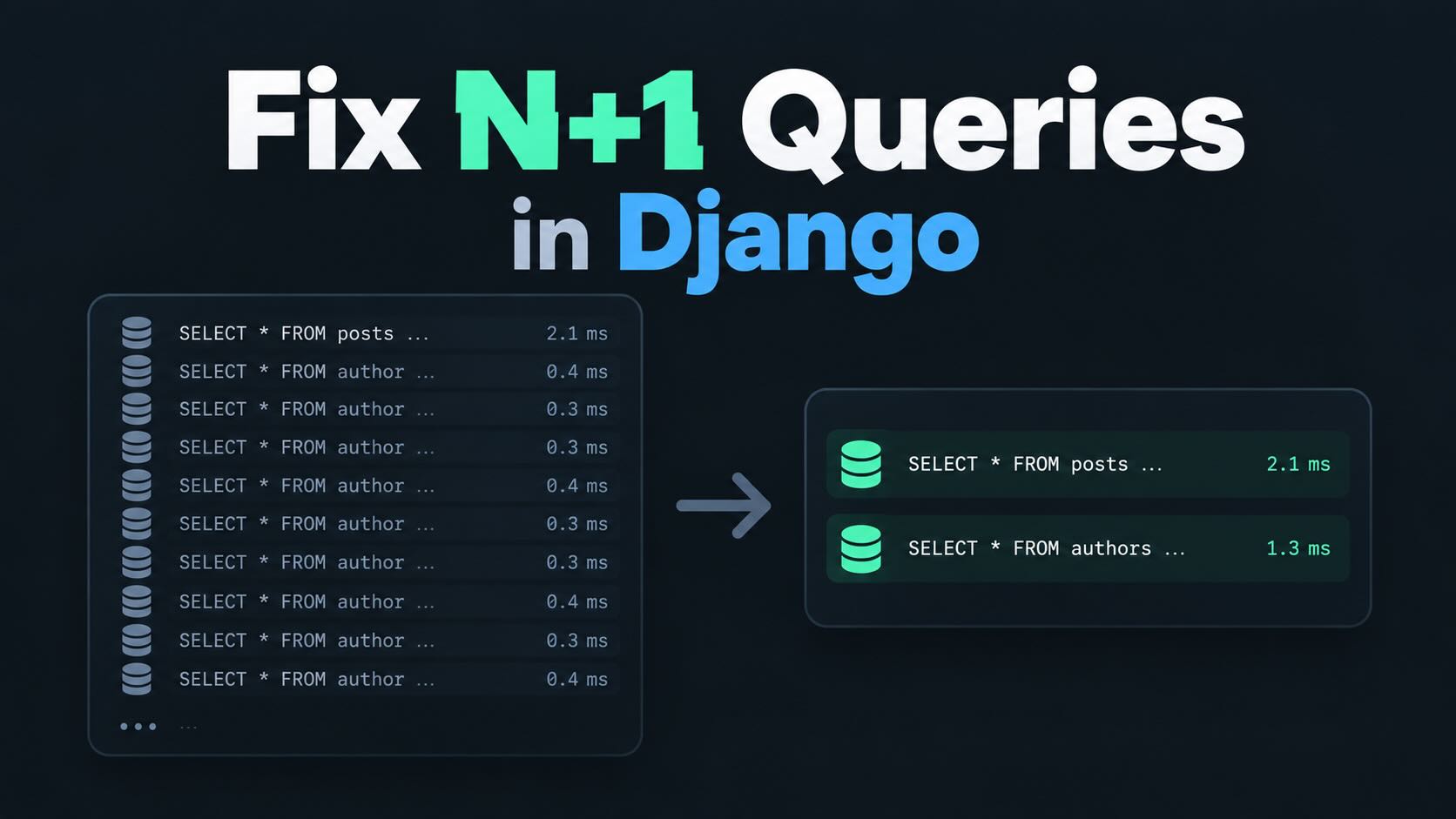
What an N+1 query actually looks like
The easiest way to understand an N+1 problem is to build one.
Let's say I have a small article app with authors, categories and tags. The models look like this:
from django.db import models


class Author(models.Model):
    name = models.CharField(
        max_length=200,
    )

    def __str__(self):
        return self.name


class Category(models.Model):
    name = models.CharField(
        max_length=200,
    )

    def __str__(self):
        return self.name


class Tag(models.Model):
    name = models.CharField(
        max_length=100,
    )

    def __str__(self):
        return self.name


class Article(models.Model):
    title = models.CharField(
        max_length=255,
    )

    author = models.ForeignKey(
        Author,
        on_delete=models.CASCADE,
        related_name="articles",
    )

    category = models.ForeignKey(
        Category,
        on_delete=models.CASCADE,
        related_name="articles",
    )

    tags = models.ManyToManyField(
        Tag,
        related_name="articles",
    )

    is_published = models.BooleanField(
        default=False,
    )

    def __str__(self):
        return self.title
Now I want a simple page that lists every published article. The first version of the view looks completely normal:
from django.shortcuts import render

from .models import Article


def article_list(request):
    articles = Article.objects.filter(
        is_published=True,
    )

    return render(
        request,
        "articles/article_list.html",
        {
            "articles": articles,
        },
    )
And the template:
{% for article in articles %}
    <article>
        <h2>
            {{ article.title }}
        </h2>

        <p>
            By {{ article.author.name }}
        </p>

        <p>
            Category:
            {{ article.category.name }}
        </p>

        <ul>
            {% for tag in article.tags.all %}
                <li>
                    {{ tag.name }}
                </li>
            {% endfor %}
        </ul>
    </article>
{% endfor %}
There isn't anything obviously wrong with that code. The page works, the template is readable and Django takes care of loading the related objects for us.
The problem is how Django loads them.
The hidden queries inside the template
When Django evaluates the article queryset, it runs one query to fetch the articles:
SELECT ...
FROM articles_article
WHERE is_published = true;
So far, so good.
But the query only contains fields from the Article table. When the template accesses:
{{ article.author.name }}Django needs the related author. Because that object wasn't loaded with the article, Django performs another query.
Then it reaches the next article and does it again.
The same thing happens for:
{{ article.category.name }}And again when we loop over:
{% for tag in article.tags.all %}Suppose the page contains 20 articles. The query count could look roughly like this:
1 query  - fetch the 20 articles

20 queries - fetch each article's author

20 queries - fetch each article's category

20 queries - fetch each article's tags

Total: 61 queries
The first query is the "1". Everything that follows once per object is the "N". That's where the name N+1 comes from.
The annoying part is that the page can feel perfectly fast when I only have two or three articles in the database. It gets worse as the number of rows grows, because the number of queries grows with it.
Don't guess how many queries Django is making
I don't want to optimize database queries because I have a feeling that a page might be slow. I want to see what Django is actually doing.
Django's own optimization documentation recommends profiling first, and Django Debug Toolbar is one of the easiest ways to do that while developing.
Install it:
pip install django-debug-toolbarAdd it to INSTALLED_APPS:
INSTALLED_APPS = [
    # ...

    "debug_toolbar",
]
Then add the middleware:
MIDDLEWARE = [
    "debug_toolbar.middleware.DebugToolbarMiddleware",

    # The rest of the middleware...
]
For a normal local development setup, you'll also need to expose the toolbar URLs and make sure it is only enabled while DEBUG is on.
Once the toolbar is visible, open the article list and click the SQL panel. Instead of guessing, I can now see every query Django executed while rendering that request.
N+1 problems are usually easy to spot because the SQL panel contains the same query over and over again with a different ID.
You might see something like:
SELECT ... FROM authors_author WHERE id = 4;
SELECT ... FROM authors_author WHERE id = 7;
SELECT ... FROM authors_author WHERE id = 2;
SELECT ... FROM authors_author WHERE id = 4;
SELECT ... FROM authors_author WHERE id = 9;
...
If I see that pattern repeated 20 times while rendering a list of 20 articles, I know where to look.
You can inspect queries without the Debug Toolbar too
Django Debug Toolbar is what I normally use in development because the SQL panel is convenient, but sometimes I just want to inspect the queries from Python.
When DEBUG=True, Django records executed queries in:
from django.db import connection


print(len(connection.queries))

for query in connection.queries:
    print(query["sql"])
I wouldn't build application logic around connection.queries, but it's useful when debugging something quickly in the shell or testing a small example.
For automated tests, Django gives us something even better: assertNumQueries(). We'll use that later so the N+1 problem doesn't quietly come back.
Fix the foreign keys with select_related()
The author and category relationships are both foreign keys. Each article points to exactly one author and one category.
That's where select_related() fits.
Change the queryset to:
articles = (
    Article.objects
    .filter(
        is_published=True,
    )
    .select_related(
        "author",
        "category",
    )
)
select_related() tells Django to fetch those related objects in the same SQL query as the articles.
Instead of running one query for the articles and another query every time the template touches an author or category, Django creates SQL joins and includes those rows in the original result.
Conceptually, the query becomes something like:
SELECT
    article.*,
    author.*,
    category.*
FROM article
INNER JOIN author
    ON article.author_id = author.id
INNER JOIN category
    ON article.category_id = category.id
WHERE article.is_published = true;
Now the template can do:
{{ article.author.name }}
{{ article.category.name }}
Without going back to the database.
Our 61-query example has now dropped substantially:
1 query  - articles + authors + categories

20 queries - tags

Total: 21 queries
That's much better, but we still have one tags query for every article.
Why select_related() doesn't work for tags
It might be tempting to add:
.select_related(
    "author",
    "category",
    "tags",
)
But that isn't how select_related() works.
It is designed for relationships where one object points to a single related object, mainly ForeignKey and OneToOneField.
Our tags relationship is many-to-many. One article can have several tags, and the same tag can belong to several articles.
Trying to include all of that in the same join would multiply rows. An article with five tags would appear five times in the SQL result before Django even started turning those rows back into model objects.
For "many" relationships, Django gives us prefetch_related().
Fix the tags with prefetch_related()
Update the queryset again:
articles = (
    Article.objects
    .filter(
        is_published=True,
    )
    .select_related(
        "author",
        "category",
    )
    .prefetch_related(
        "tags",
    )
)
prefetch_related() works differently from select_related().
Instead of joining everything into the main query, Django performs an additional query that loads the related objects in one batch. It then connects those objects to the correct articles in Python.
So with 20 articles, the pattern is now roughly:
Query 1:
Fetch articles, authors and categories.

Query 2:
Fetch the tags belonging to those articles.

Total: 2 queries
We went from 61 queries to 2 without changing the template at all.
That is the kind of optimization I like. The template still reads naturally, and the view now tells Django which related data the page is going to need.
select_related() and prefetch_related() solve different problems
I find it easier to remember the difference by thinking about the shape of the relationship.
If one row points to one related row, I normally start with select_related(). That includes foreign keys and one-to-one relationships.
If one object can have several related objects, I normally look at prefetch_related(). That includes many-to-many relationships and reverse foreign-key relationships.
For example:
Article.objects.select_related(
    "author",
    "category",
)
Works well because every article has one author and one category.
And:
Article.objects.prefetch_related(
    "tags",
)
Works well because every article can have several tags.
You can use both on the same queryset, which is exactly what we did above.
Reverse foreign keys can create the same problem
Many-to-many fields aren't the only place where prefetch_related() helps.
Imagine an author detail page:
author = Author.objects.get(
    pk=author_id,
)
And the template:
{% for article in author.articles.all %}
    {{ article.title }}

    {% for tag in article.tags.all %}
        {{ tag.name }}
    {% endfor %}
{% endfor %}
author.articles is the reverse side of the Article.author foreign key. One author can have many articles, so select_related() isn't the right tool for that relationship.
We can prefetch it:
author = (
    Author.objects
    .prefetch_related(
        "articles",
    )
    .get(
        pk=author_id,
    )
)
And if the template also needs every article's tags:
author = (
    Author.objects
    .prefetch_related(
        "articles__tags",
    )
    .get(
        pk=author_id,
    )
)
Django can follow relationships several levels deep. That can be useful, but I try not to turn every queryset into a giant list of relationships "just in case". I want to fetch the data the page actually uses.
Use Prefetch when the related queryset needs more control
A normal string is enough for simple cases:
.prefetch_related(
    "tags",
)
But sometimes I don't want every related object.
Imagine tags have an is_active field and the page should only show active tags. Django's Prefetch object lets me provide the queryset used for the prefetch:
from django.db.models import Prefetch

from .models import Article
from .models import Tag


articles = (
    Article.objects
    .filter(
        is_published=True,
    )
    .select_related(
        "author",
        "category",
    )
    .prefetch_related(
        Prefetch(
            "tags",
            queryset=Tag.objects.filter(
                is_active=True,
            ),
        ),
    )
)
The template can continue using:
article.tags.allAnd the prefetched cache contains the filtered queryset.
I can also store the prefetched result on a separate attribute:
articles = (
    Article.objects
    .prefetch_related(
        Prefetch(
            "tags",
            queryset=Tag.objects.filter(
                is_active=True,
            ),
            to_attr="active_tags",
        ),
    )
)
Then the template uses:
{% for tag in article.active_tags %}
    {{ tag.name }}
{% endfor %}
I like to_attr when the prefetched data represents a subset rather than the complete relationship. It makes the code more explicit.
A common mistake after prefetching
There is a small trap with prefetch_related().
Suppose I do this:
articles = (
    Article.objects
    .prefetch_related(
        "tags",
    )
)
Then later:
for article in articles:
    active_tags = article.tags.filter(
        is_active=True,
    )
The prefetch doesn't help that second query.
Django prefetched the equivalent of:
article.tags.all()Calling filter() creates a different queryset, so Django goes back to the database.
If I know I'm only going to use active tags, I would put the filter inside Prefetch from the start instead of prefetching data I don't use.
The N+1 query might not be in the view
One reason these problems are easy to miss in Django is that the extra database access can happen far away from the original queryset.
The view might contain nothing more than:
articles = Article.objects.all()The N+1 query can then be triggered by a template, a serializer, a property on the model or even __str__().
For example:
class Article(models.Model):
    # ...

    def __str__(self):
        return (
            f"{self.title} - "
            f"{self.author.name}"
        )
If I load 100 articles and print them, accessing self.author.name can trigger another 100 queries unless the author relationship was loaded in advance.
This is why I like looking at the actual SQL rather than only reading the view and assuming the queryset looks harmless.
Serializers can hide N+1 queries too
The same issue appears in Django REST Framework or any API code that accesses related objects.
A serializer might include:
author_name = serializers.CharField(
    source="author.name",
)
There is nothing wrong with that field by itself. But if the view returns 100 articles without select_related("author"), the serializer can trigger one query per article.
The fix belongs on the queryset:
queryset = (
    Article.objects
    .select_related(
        "author",
        "category",
    )
    .prefetch_related(
        "tags",
    )
)
I think of serializers and templates as consumers of data. The queryset should know enough about how that data will be used to load it efficiently.
Don't put select_related() everywhere
Once you fix a page that went from 61 queries to 2, it's tempting to start adding select_related() and prefetch_related() to every queryset in the project.
I wouldn't do that.
select_related() creates joins and returns more columns in the initial query. That's useful when I need those related objects, but it's unnecessary work if I don't.
prefetch_related() loads related objects into memory. Django's documentation specifically points out that the primary queryset and the prefetched objects are fully loaded into their result caches.
If I fetch 10,000 articles and prefetch every tag, comment and related object even though the page only shows the title, I've replaced one performance problem with another.
The goal isn't to make the number of queries as small as mathematically possible. The goal is to avoid unnecessary database work for the page I'm actually rendering.
More queries can sometimes be fine
A page using two queries isn't automatically faster than every page using three queries.
select_related() can create a larger and more complicated SQL query. prefetch_related() can create a large IN query when the main queryset contains a lot of rows.
The database schema, indexes, amount of data and how much of that data I actually use all matter.
This is why I like Django's advice here: profile first, change the queryset, then profile again.
If the query count goes from 61 to 2 and the response time drops noticeably, that's an easy win. If I'm changing an already-fast page from four queries to three and making the code much harder to understand, I might leave it alone.
Use QuerySet.explain() when the query itself is slow
N+1 problems are about running too many queries, but sometimes the number of queries is already fine and one of them is just slow.
Django gives us QuerySet.explain() for that:
queryset = (
    Article.objects
    .filter(
        is_published=True,
    )
    .select_related(
        "author",
        "category",
    )
)

print(
    queryset.explain()
)
The output depends on the database, but it can show how the database plans to execute the query and whether it is using indexes.
I wouldn't reach for explain() first when the SQL panel clearly shows the same query being executed 100 times. That's an N+1 problem. But once the query count looks sensible, the execution plan is the next place I look if the page is still slow.
Add a test for the query count
Fixing an N+1 problem is good. Keeping it fixed is better.
Django's test tools include assertNumQueries(), which lets me lock down the number of queries a piece of code is expected to run.
For example:
from django.test import TestCase
from django.urls import reverse

from .models import Article
from .models import Author
from .models import Category
from .models import Tag


class ArticleListTests(TestCase):
    def setUp(self):
        author = Author.objects.create(
            name="Stein",
        )

        category = Category.objects.create(
            name="Django",
        )

        tags = [
            Tag.objects.create(
                name="Python",
            ),
            Tag.objects.create(
                name="Performance",
            ),
        ]

        for index in range(20):
            article = Article.objects.create(
                title=f"Article {index}",
                author=author,
                category=category,
                is_published=True,
            )

            article.tags.set(tags)

    def test_article_list_query_count(self):
        with self.assertNumQueries(2):
            response = self.client.get(
                reverse(
                    "articles:list",
                )
            )

            self.assertEqual(
                response.status_code,
                200,
            )
The exact query count in a real project can be higher because middleware, sessions, authentication or other parts of the page might query the database too. In that case I might test the queryset and template rendering more narrowly, or use the actual stable number for that view.
The useful part is that adding another related field to the template can't silently turn a two-query page back into a 22-query page without a test noticing.
The complete fixed view
After all of that, our final view is still very small:
from django.shortcuts import render

from .models import Article


def article_list(request):
    articles = (
        Article.objects
        .filter(
            is_published=True,
        )
        .select_related(
            "author",
            "category",
        )
        .prefetch_related(
            "tags",
        )
    )

    return render(
        request,
        "articles/article_list.html",
        {
            "articles": articles,
        },
    )
The template hasn't changed:
{% for article in articles %}
    <article>
        <h2>
            {{ article.title }}
        </h2>

        <p>
            By {{ article.author.name }}
        </p>

        <p>
            Category:
            {{ article.category.name }}
        </p>

        <ul>
            {% for tag in article.tags.all %}
                <li>
                    {{ tag.name }}
                </li>
            {% endfor %}
        </ul>
    </article>
{% endfor %}
But the way Django gets the data is completely different.
Instead of one initial query followed by more queries every time the template touches a relationship, we've told the ORM what data the page is going to need before the template starts rendering.
A note about Django 6.1
If you're using Django 6.1, there is now another tool worth knowing about. Django added fetch modes, including FETCH_PEERS, which can batch-load missing fields for objects that came from the same queryset.
That can reduce some N+1 cases without explicitly listing every relationship up front. I still think select_related() and prefetch_related() are worth learning properly because they make the expected data access explicit, give you more control, and work well in places where I already know exactly which relations the page is going to use.
For me, the workflow stays the same: open the page, inspect the actual SQL, find repeated queries, change the queryset and measure again.
What I look for when a Django page feels slow
If a Django page starts getting slower as more rows appear, N+1 queries are one of the first things I check.
I open Django Debug Toolbar and look at the SQL panel. If I see the same query repeated over and over with a different primary key, I look at the template, serializer or model property that is touching that relationship.
For foreign keys and one-to-one relationships, select_related() is usually the first thing I try. For many-to-many and reverse relationships, I look at prefetch_related(). If the related objects need filtering or their own optimizations, I use Prefetch with a custom queryset.
Then I reload the page and check the SQL again.
That's the part I think matters most. N+1 problems aren't difficult because the fix is complicated. They're difficult because the extra queries are often hidden behind normal-looking Django code. Once I can see them, the ORM already gives me the tools to fix most of them.